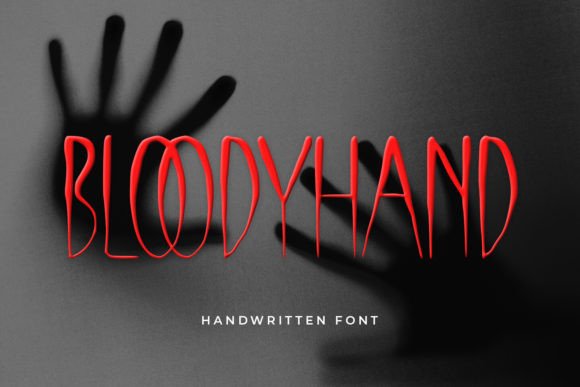
Bloody Hand: A Creepy Handwritten Font for Craft Projects
If you’re a maker, an Etsy seller, or a craft enthusiast who loves to create products with a dark, moody, or slightly eerie aesthetic, you know how hard it is to find a handwritten font that balances charm with legibility. Many decorative fonts look great on screen but fall apart when printed on a sticker, cut with a blade, or scaled down for a product tag. That’s where Bloody Hand steps in. This is not a delicate script or a polished calligraphy face. It’s a creepy handwritten font with a raw, inky personality that feels like it was scrawled in a rush by someone who means business. And for crafters who sell physical goods, that unique edge can be exactly what sets your products apart.
In this article, I’ll walk through how Bloody Hand can be used in real handmade and printable projects — from labels and stickers to signs, shirts, and templates. We’ll look at readability, cutting machine considerations, font pairing, and licensing so you can use it confidently in your shop.
What Makes Bloody Hand Different from Other Handwritten Fonts?
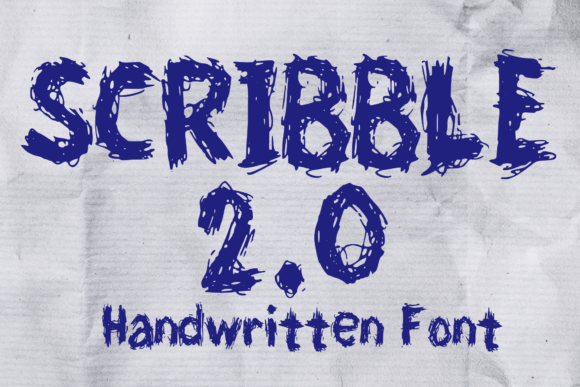
Scrolling through font marketplaces, you see a lot of handwritten fonts that pretend to be casual but are actually very polished. They have perfect loops, uniform spacing, and a clean rhythm. Bloody Hand does the opposite. It leans into imperfection. The strokes are uneven, the letters slant in a way that feels urgent, and the overall texture mimics a marker or ink pen running across rough paper. This gives it a creepy handwritten font vibe that is perfect for horror-themed projects, Halloween decor, gothic branding, or any product that needs to evoke a sense of mystery or dark romance.
But don’t let the “creepy” label fool you. This font has a surprising amount of versatility. Because it’s rooted in a genuine handwriting style, it remains readable even when used for short phrases, product names, or quotes. The irregular letterforms add character without becoming a puzzle for the reader. That’s a rare balance in the display font category.
Practical Uses for Bloody Hand in Your Craft Business
When you’re creating products for sale, every design choice matters. The font you choose shapes how customers perceive your brand — whether it’s playful, elegant, rustic, or, in this case, eerie and edgy. Bloody Hand works especially well for projects where you want to convey a handmade, slightly rough feel without sacrificing professionalism. Here are some of the most effective ways to use it:
Labels, Stickers, and Product Tags
Think about a candle label with a name like “Witch’s Brew” or “Graveyard Dirt” set in Bloody Hand, paired with a simple illustration. The font immediately reinforces the theme. The same goes for bath bombs, soaps, or lotions sold under a spooky brand. Because the letterforms are bold and distinct, they hold up well on small stickers and tags. For cutting on a Cricut or Silhouette, the font’s consistent stroke width makes it easy to weed, especially if you convert it to a single-layer design. I recommend using Bloody Hand for product names or short descriptions; avoid long paragraphs on tiny labels. It works best as a focal point.
For sticker sheets, use it for the main title — like “Caution: Toxic” or “Handle with Fear” — and pair it with a simpler sans serif for the fine print. The contrast will make your sticker pop.
Greeting Cards, Invitations, and Stationery
Halloween parties, gothic weddings, or even birthday invites for someone who loves the macabre — Bloody Hand is a natural fit for paper goods. Use it on the front of the card for the main message, then switch to a clean sans serif font for the inside details. The handwritten quality makes the invitation feel personal, like it was written by the host themselves. For wedding stationery with a dark romance theme, Bloody Hand can be used for the couple’s names on the save-the-date or the welcome sign. It adds an intimate, handcrafted touch that a standard script font can’t replicate.
T-Shirts, Tote Bags, and Apparel
When designing for fabric, you need a font that is bold enough to read from a distance but still has style. Bloody Hand works wonderfully for single-line quotes, band logos, or product names on shirts and totes. Because it’s a handwritten font with a somewhat irregular baseline, it mimics the look of hand-painted lettering. That’s exactly what customers want when they buy a handmade or indie brand shirt. Pair it with a distressed graphic or a simple icon, and you have a strong design. For screen printing, the font’s thick strokes mean it will hold up even in smaller sizes, though I advise testing a sample first.
Signs, Wall Art, and Home Decor
Farmhouse signs with a dark twist, spooky quote prints, or welcome boards for a gothic entryway — Bloody Hand adds a lot of personality to home decor. The font’s natural unevenness works well when painted or vinyl cut. For a wood sign, you can paint the letters by hand using the font as a stencil, and the imperfect edges will blend in beautifully. For printable wall art, use it for the primary quote and a simple serif for the attribution. The effect is moody but polished.
Readability and Production Considerations
One of the biggest concerns when using a display font for physical products is readability at small sizes. Bloody Hand fares well because each letter has a distinct shape. The lowercase “a” and “e” are open, and the ascenders and descenders are clear. However, I recommend using it for headlines, names, or short phrases rather than body text. For a product label that is 2 inches wide, keep the word count to three or four words maximum. For cutting machines, if you’re using the font as a cut file, make sure to set the stroke weight to a medium thickness — too thin and the fine details might lift; too thick and you lose the handwritten feel. Test a few samples before mass production.
If you’re creating digital templates or printables, Bloody Hand works well because it’s a font file that you can install and use in any design software. The included file formats (typically OTF and TTF) are compatible with most programs, including Cricut Design Space, Silhouette Studio, Adobe Illustrator, and Canva. Check the product listing to confirm that alternates, ligatures, and swashes are included — many handwritten fonts offer extra glyphs that let you customize the letter connections. If available, using those alternates can make your designs look even more organic and less repetitive.
For multilingual projects, Bloody Hand likely supports standard Latin characters, but verify the multilingual support if you plan to sell to international customers. That can save you a headache later.
Font Pairing Ideas for Bloody Hand
To make your designs look professional and cohesive, pair Bloody Hand with a complementary typeface. Because it’s an expressive handwritten font, you want to pair it with a clean, neutral font that lets the handwriting shine. Here are three combinations that work well:
- Bloody Hand + a clean sans serif: Fonts like Montserrat, Roboto, or Open Sans provide a modern contrast. Use the sans serif for dates, prices, or secondary information. This pairing is great for labels, packaging, and social media graphics.
- Bloody Hand + a simple serif: For a more vintage or literary feel, pair it with a serif font like Playfair Display or Lora. Use the serif for longer text and Bloody Hand for the title. This works beautifully for wedding stationery, book covers, and quote prints.
- Bloody Hand + another script font: If you want a layered, handwritten look, combine it with a subtle, connected script font. But be careful — too many scripts can look messy. Use Bloody Hand for the main words and a lighter script for a subheading or ornament.
When in doubt, test the pairing in a mockup before committing. A good rule is to keep the supporting font simple and let Bloody Hand do the heavy lifting for personality.
Commercial Licensing and Using Bloody Hand in Your Shop
If you’re selling products that include Bloody Hand — whether physical items like T-shirts, mugs, candles, or digital downloads like templates, SVG designs, or printables — you need to understand the commercial license that comes with the font. Many fonts are sold with a standard license that allows you to use them in your own products, but there are often restrictions on the number of sales, the type of product (physical vs. digital), or whether you can embed the font in a file you sell.
For Bloody Hand, check the product listing carefully. Typically, a premium font from a marketplace like Creative Market or Font Bundles will include a basic commercial license that covers most handmade and small business uses. That means you can use it on your own products, in your shop, and even for client work in some cases. However, if you plan to sell digital templates or printable files that include the font as a text layer, you may need an extended license. Always read the terms. A good practice is to keep a copy of the license file for your records. This protects you and respects the font designer’s work.
When creating SVG designs for cutting machines, remember that you typically convert the text to a path or outline. That’s allowed under most licenses because you’re not redistributing the font file itself, just the design. But if you’re selling editable templates where the customer can type their own text, the font must be installed on their computer, which means they need to purchase the font separately. You can note this in your product description.
Using a commercial font like Bloody Hand in your business is an investment in your brand identity. When you choose a font that fits your aesthetic perfectly, it elevates the perceived quality of your products. Customers notice the details — a well-chosen typeface can make a label look professional, a shirt design look exclusive, or a card feel personal. Bloody Hand gives you that dark, handmade edge without sacrificing readability or production practicality.
Whether you’re launching a Halloween collection, rebranding your gothic-inspired shop, or just want to add a touch of the macabre to your next product line, this creepy handwritten font is a versatile tool. Try it on a few mockups, test it at different sizes, and see how it transforms your designs. Your customers will feel the difference.